Poster Print Service
A large-format printer suitable for poster printing is available at the Katsura Campus B-Cluster. It can print in color on 36-inch (914 mm) wide roll paper (capable of printing up to A0 size). Please feel free to use it for academic conference presentations, graduation research, and more.
Service Overview
Reservation
Prior reservation is required to use the printer. Please let us know your preferred date and time via the reservation form. Our staff will send you a reservation confirmation email after reviewing your request.
- Poster Printer Reservation Form [On-Campus Only]
* Log-in with your SPS-ID/ECS-ID is required when accessing from off-campus.
Service Details
Location
Katsura Campus B-Cluster
Operating Hours
Weekdays 9:00 - 12:00, 13:00 - 17:00
* Excluding holidays.
* Maximum of 2 consecutive hours. Reservations cannot span across the morning and afternoon sessions.
Eligibility
Kyoto University faculty, staff, and students belonging to a laboratory, etc.
Other Notices
Printing is limited to materials necessary for education, research, and university administration at Kyoto University. Please note in advance that printing may become temporarily unavailable due to sudden equipment malfunction.
- Requests to Users [On-Campus Only]
Procedure on the Day of Use
1. Preparation of Print Data
Please save your print data as a PDF on a USB flash drive and bring it with you. We also recommend bringing the original source files (e.g., .docx, .pptx, .ai, .psd) in case you need to make any adjustments due to printing errors.
2. Reception
On the day of your reservation, please come to the Center for Information Technology, located at the north end of the second floor in the Administration Building, B Cluster. After completing the usage procedures, we will guide you to the large-format printer room. (Room 210, Technical Consultation Room, 2nd Floor, Intech Center Building).
At reception, we will perform a full virus scan on your USB flash drive. Please be aware that this may take some time if there are a large number of files on the drive.
3. Self-Service Printing
Users are requested to operate the printer themselves. A manual detailing the operating procedures is provided.
* We will assist you in case of trouble, such as running out of ink.
Printing Costs
Printing costs will be charged to your laboratory or department depending on the number of prints and the type of paper used. We will send the invoice during the fiscal year-end processing period (around January to February).
- Printing Costs by Paper Type [On-Campus Only]
* Students must consult the head of their laboratory and obtain approval for the expenses before use.
* In principle, charges will apply based on the number of prints even if a print fails (except in cases of equipment malfunction, etc.).
Printer Specifications
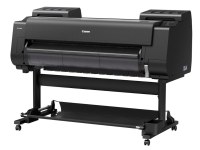
Maximum Resolution: 2400 dpi x 1200 dpi
Available Paper Types (36-inch width):
- Plain Paper
- Coated Paper
- Photo Glossy Paper
- Flame-Retardant Cloth
Similar Services (Yoshida Campus)
At the Yoshida Campus, the Institute for Information Management and Communication (IIMC) offers a printing service (large-format printer).
- Large-Format Printer [IIMC]