
イベントカレンダーの作成 [Plone3.3]
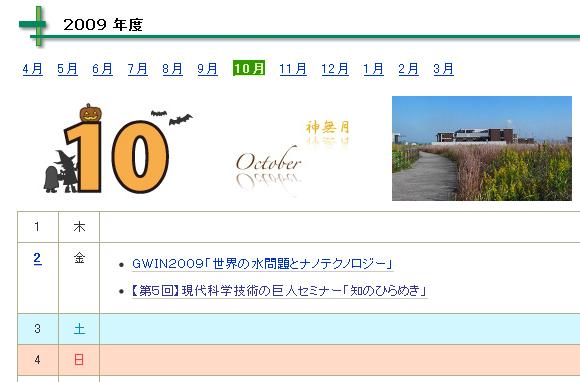 年・月・日表示ができるイベントカレンダーをコレクションのビューとして作成する。利用方法はコレクションで表示するイベントタイプの検索条件(コンテンツタイプ、位置、日付など)を指定することを想定する。
スキンレイヤ
スキンレイヤの登録
まず portal_skins 内に新しくスキン格納用のフォルダ(eng_calendar_skins)を追加する。次に portal_skins の Properties で、custom の下に eng_calendar_skins を追加する。これでスキンにこのディレクトリも読み込まれるようになる。
Name : Plone Default
Layers :
  custom
  eng_calendar_skins
   :
スキンの作成
週の文字列生成スクリプト
週の文字列を生成するスクリプト eng_calendar_weekstr をスキンレイヤ内に作成する。
from Products.CMFCore.utils import getToolByName
from Products.CMFPlone import PloneMessageFactory

translation_service = getToolByName(context, 'translation_service');
result_list = []
for i in xrange(7):
    msgid = translation_service.day_msgid(i, format='a')
    english = translation_service.weekday_english(i, format='a')
    result_list.append(PloneMessageFactory(msgid, default=english))

return result_list
イベントリスト生成スクリプト
1ヶ月のイベントリスト生成スクリプト eng_calendar を次のように作成する。パラメータとしてリストを作成する年、月を渡す。
Parameter List
year, month
本体
end_date = container.portal_calendar.getNextMonth(month, year) - 1
last_day = end_date.day()

results = context.queryCatalog(
              end =  { 'query' : DateTime(year, month, 1, 0, 0), 'range' : 'min'},
              start = { 'query' : DateTime(year, month, last_day, 23, 59), 'range' : 'max'},
              sort_on = 'start',
)

event_list = []
for i in xrange(last_day):
    day = i + 1
    event_list.append({ 'day': day,
                        'week': DateTime(year, month, day).dow(),
                        'daily_events': [], })

for result in results:
    if result.start.Date() == result.end.Date():
        day = result.start.day()
        event_list[day-1]['daily_events'].append( { 'title': result.Title,
                                                    'start': result.start,
                                                    'end': result.end,
                                                    'location': result.location,
                                                    'url': result.getURL(), } )
    else:
        if result.start < DateTime(year, month, 1, 0, 0):
            day_begin = 1
        else:
            day_begin = result.start.day()
        if result.end > DateTime(year, month, last_day, 23, 59):
            day_end = last_day
        else:
            day_end = result.end.day()
        for day in xrange(day_begin, day_end + 1):
            event_list[day-1]['daily_events'].append( { 'title': result.Title,
                                                        'start': result.start,
                                                        'end': result.end,
                                                        'location': result.location,
                                                        'url': result.getURL(), } )

return event_list
カレンダーテンプレート
イベントカレンダーを表示するテンプレートを eng_calendar_view として次のように作成する。
<html xmlns="http://www.w3.org/1999/xhtml" xml:lang="en"
lang="en"
metal:use-macro="here/main_template/macros/master"
i18n:domain="plone">
<body>
<div metal:fill-slot="main">
<metal:main_macro define-macro="main">
<metal:body define-macro="body_macro"
tal:define="kssClassesView context/@@kss_field_decorator_view;
getKssClasses nocall:kssClassesView/getKssClassesInlineEditable;
templateId template/getId">
<div tal:replace="structure provider:plone.abovecontenttitle" />
<h1 class="documentFirstHeading">
<metal:field use-macro="python:here.widget('title', mode='view')">
Title
</metal:field>
</h1>
<div tal:replace="structure provider:plone.belowcontenttitle" />
<p class="documentDescription">
<metal:field use-macro="python:here.widget('description', mode='view')">
Description
</metal:field>
</p>
<div tal:replace="structure provider:plone.abovecontentbody" />
<div tal:define="translation python:context.translation_service;
today python:DateTime();
month request/month | today/month;
month python:test(not request.has_key('month') and request.has_key('year'), 4, month);
month python:int(month);
day request/day | today/day;
day python:int(day);
orig_year request/year | today/year;
orig_year python:int(orig_year);
year python:month<4 and orig_year-1 or orig_year;
week_list python:context.eng_calendar_weekstr();
en_week_list python: [ translation.weekday_english(i, format='a') for i in range(0,7) ];
month_english python:translation.month_english(month);
event_list python:context.eng_calendar(orig_year, month);
base_url python:context.absolute_url();
msgfactory python:modules['Products.CMFPlone'].PloneMessageFactory;
param_year python:request.has_key('year');
param_month python:request.has_key('month');
param_day python:request.has_key('day');">
<!-- 年別タブ -->
<div tal:define="results python:context.queryCatalog( sort_on='start' );"
tal:condition="results">
<div id="year-tabs" tal:define="today_year today/year;
today_year python:int(today_year);
results python:context.queryCatalog( sort_on='start' );
month_begin python:test(results, results[0].start.month(), month);
year_begin python:test(results, results[0].start.year(), orig_year);
year_begin python:month_begin<4 and year_begin-1 or year_begin;
results python:context.queryCatalog( sort_on='end' );
month_end python:test(results, results[len(results)-1].end.month(), month);
year_end python:test(results, results[len(results)-1].end.year(), orig_year);
year_end python:month_end<4 and year_end-1 or year_end;">
<ul>
<tal:items tal:repeat="item python:xrange(year_begin, year_end+1)">
<li class="year-tab">
<a href="#"
tal:attributes="href python:base_url + '?year=' + str(item)">
<span tal:replace="python:str(item)" /><span tal:replace="python:test(language == 'ja', u'\u5e74\u5ea6', '')" />
</a>
</li>
</tal:items>
</ul>
</div>
</div>
<div class="visualClear"><!-- --></div>
<h2><span tal:replace="year" /> <span tal:replace="python:test(language == 'ja', u'\u5e74\u5ea6', u'Events')" /></h2>
<!-- 月別タブ -->
<div id="month-tabs" tal:define="month_list python:range(4,13) + range(1,4);"
tal:condition="python:not param_year or param_month or param_day">
<ul>
<tal:item repeat="month_num month_list">
<li class="month-tab"
tal:define="tab_year python:test(month_num<4, year+1, year)"
tal:attributes="class python:(month_num == month and 'active ' or '') + 'month_tab'">
<a href="#"
tal:attributes="href python:base_url + '?year=' + str(tab_year) + '&month=' + str(month_num);">
<span tal:define="english python:translation.month_english(month_num);
msgid python:translation.month_msgid(month_num);
msg python:msgfactory(msgid, default=english);"
tal:replace="msg">
April
</span>
</a>
</li>
</tal:item>
</ul>
</div>
<!-- 月カレンダーのヘッダ -->
<div id="calendar_header"
tal:condition="python:not param_day and (param_month or not param_year)">
<div id="april-logo" class="month-logo"
tal:attributes="id python:month_english.lower() + '-logo';
class string:month-logo;">
<img tal:attributes="src python:month_english.lower() + '-logo.jpg';
alt python:month_english;" />
</div>
<div id="april-picture" class="month-picture"
tal:attributes="id python:month_english.lower() + '-picture';
class string:month-picture;">
<img tal:attributes="src python:month_english.lower() + '-picture.jpg';" />
</div>
</div>
<!-- 月カレンダーのカレンダー部 -->
<table id="current_month_events"
tal:condition="python:not param_day and (param_month or not param_year)">
<tal:item tal:repeat="item event_list">
<tr class="event_item"
tal:define="week_str python:week_list[item['week']];
en_week_str python:en_week_list[item['week']].lower();"
tal:attributes="class python:'event_item week_' + en_week_str; ">
<td class="day">
<a href="#"
tal:omit-tag="python:not item['daily_events']"
tal:attributes="href python:base_url + '?year=' + str(orig_year) + '&month=' + str(month) + '&day=' + str(item['day'])">
<span tal:replace="python:item['day']">1</span>
</a>
</td>
<td class="week">
<span tal:content="week_str">Mon</span>
</td>
<td class="event_of_day">
<ul tal:condition="item/daily_events">
<li tal:repeat="event item/daily_events">
<a href="#" tal:attributes="href event/url">
<span tal:replace="event/title" />
</a>
</li>
</ul>
</td>
</tr>
</tal:item>
</table>
<!-- 日カレンダーのヘッダ -->
<div tal:condition="python:param_day">
<div id="calendar_header"
tal:define="msgid python:translation.month_msgid(month);
english python:translation.month_english(month);
month_msg python:msgfactory(msgid, default=english);
week_num python:event_list[day-1]['week'];
week_msgid python:translation.day_msgid(week_num);
week_english python:translation.weekday_english(week_num);
week_msg python:msgfactory(week_msgid, default=week_english);">
<div class="current-date">
<div class="today" tal:condition="python:language == 'ja'">
<span class="month" tal:content="month_msg" />
<span class="day" tal:content="python:str(day)">28</span><tal:date tal:replace="python:u'\u65e5'" />
<span class="weekday" tal:content="week_msg" />
</div>
<div class="today" tal:condition="python:language != 'ja'">
<span class="weekday" tal:content="week_msg">Monday</span>,
<span class="month" tal:content="month_msg">April</span>
<span class="day" tal:content="python:str(day)">28</span>
</div>
</div>
<div id="current_month_calendar" class="event_calendar">
<div id="calendar_month">
<span tal:replace="month_msg">March</span>
</div>
<table>
<tr>
<td class="weekday_sun" i18n:translate="weekday_sun_short">Su</td>
<td class="weekday_mon" i18n:translate="weekday_mon_short">Mo</td>
<td class="weekday_tue" i18n:translate="weekday_tue_short">Tu</td>
<td class="weekday_wed" i18n:translate="weekday_wed_short">We</td>
<td class="weekday_thu" i18n:translate="weekday_thu_short">Th</td>
<td class="weekday_fri" i18n:translate="weekday_fri_short">Fr</td>
<td class="weekday_sat" i18n:translate="weekday_sat_short">Sa</td>
</tr>
<tr tal:define="first_week python:event_list[0]['week'];
week_num python:len(event_list) + first_week;
week_num python:test(week_num%7, int(week_num/7)+1, int(week_num/7));"
tal:repeat="week python:xrange(week_num)">
<tal:item repeat="date python:xrange(week*7-first_week+1, week*7-first_week+8)">
<td tal:condition="python:date>0 and date<=len(event_list)"
tal:attributes="class python:event_list[date-1]['daily_events'] and 'event' or 'no_event';">
<a href="#"
tal:omit-tag="python:not event_list[date-1]['daily_events']"
tal:attributes="href python:base_url + '?year=' + str(orig_year) + '&month=' + str(month) + '&day=' + str(date);">
<span tal:replace="python:str(date)">1</span>
</a>
</td>
<td tal:condition="python:not (date>0 and date<=len(event_list))" />
</tal:item>
</tr>
</table>
</div>
</div>
</div>
<!-- 日カレンダー -->
<div id="day_events" tal:condition="python:param_day">
<div class="no_event_today"
tal:condition="python:not event_list[day-1]['daily_events']"
tal:content="python:test(language == 'ja', u'\u672c\u65e5\u958b\u50ac\u4e88\u5b9a\u306e\u30a4\u30d9\u30f3\u30c8\u306f\u3042\u308a\u307e\u305b\u3093\u3002', 'No Events Today.')"></div>
<table id="today_events" tal:condition="python:event_list[day-1]['daily_events']">
<tr class="day_list_header">
<th class="event_title"
tal:content="python:language=='ja' and u'\u884c\u4e8b\u540d' or 'Event'">Event</th>
<th class="event_when"
tal:content="python:language=='ja' and u'\u65e5\u6642\u30fb\u5834\u6240' or 'Date/Time, Location'">Date/Time</th>
</tr>
<tal:item tal:repeat="item python:event_list[day-1]['daily_events']">
<tr class="event_item">
<td class="event_title">
<a href="#" tal:attributes="href item/url;" tal:content="item/title" />
</td>
<td class="event_when"
tal:define="start_date item/start/Date;
end_date item/end/Date;">
<div tal:condition="python:start_date == end_date" tal:omit-tag="">
<span tal:content="item/start/TimeMinutes">3:10</span> -
<span tal:content="item/end/TimeMinutes"
tal:condition="python:item['start'] != item['end']">5:45</span>
<br /><span tal:content="item/location" />
</div>
<div tal:condition="python:start_date != end_date" tal:omit-tag=""
tal:define="notime python:test(item['start'].TimeMinutes()=='00:00' and item['end'].TimeMinutes()=='00:00', True, False)">
<span tal:content="python:item['start'].Date() + test(notime, '', ' ' + item['start'].TimeMinutes())">3:10</span> -
<span tal:content="python:item['end'].Date() + test(notime, '', ' ' + item['end'].TimeMinutes())">5:45</span>
<br /><span tal:content="item/location" />
</div>
</td>
</tr>
</tal:item>
</table>
</div>
<!-- 年カレンダー -->
<div class="year-page" tal:condition="python:param_year and not param_month and not param_day">
<div tal:define="month_list python:range(4,13) + range(1,4);"
tal:repeat="month month_list" tal:omit-tag="">
<div tal:define="tab_year python:test(month<4, year+1, year);
english python:translation.month_english(month, format='a').lower();"
tal:attributes="class python:'calendar-item calendar-' + english;">
<div class="year" tal:content="tab_year" />
<div class="month">
<a href="#"
tal:attributes="href python:base_url + '?year=' + str(tab_year) + '&month=' + str(month);"
tal:content="month">1</a>
</div>
<table tal:define="msgid python:translation.month_msgid(month);
english python:translation.month_english(month);
month_msg python:msgfactory(msgid, default=english);
event_list python:context.eng_calendar(tab_year, month);">
<tr class="week_head">
<td class="weekday_sun" i18n:translate="weekday_sun_short">Su</td>
<td class="weekday_mon" i18n:translate="weekday_mon_short">Mo</td>
<td class="weekday_tue" i18n:translate="weekday_tue_short">Tu</td>
<td class="weekday_wed" i18n:translate="weekday_wed_short">We</td>
<td class="weekday_thu" i18n:translate="weekday_thu_short">Th</td>
<td class="weekday_fri" i18n:translate="weekday_fri_short">Fr</td>
<td class="weekday_sat" i18n:translate="weekday_sat_short">Sa</td>
</tr>
<tr tal:define="first_week python:event_list[0]['week'];
week_num python:len(event_list) + first_week;
week_num python:test(week_num%7, int(week_num/7)+1, int(week_num/7));"
tal:repeat="week python:xrange(week_num)">
<tal:item repeat="date python:xrange(week*7-first_week+1, week*7-first_week+8)">
<td tal:condition="python:date>0 and date<=len(event_list)"
tal:attributes="class python:event_list[date-1]['daily_events'] and 'event' or 'no_event';">
<a href="#"
tal:omit-tag="python:not event_list[date-1]['daily_events']"
tal:attributes="href python:base_url + '?year=' + str(tab_year) + '&month=' + str(month) + '&day=' + str(date);">
<span tal:replace="python:str(date)">1</span>
</a>
</td>
<td tal:condition="python:not (date>0 and date<=len(event_list))" />
</tal:item>
</tr>
</table>
</div>
<div class="visualClear"
tal:condition="python: month % 3 == 0"><!-- --></div>
</div>
</div>
</div>
</metal:body>
</metal:main_macro>
</div>
</body>
</html>
画像
デザイン用の各月の画像などを同じレイヤに作成する。
イベントのXML出力
他のサイトとのイベント連携も可能となるよう XML 出力もできるようにしておく。ページテンプレートとしてスキンフォルダに eng_events_xml を追加する。追加したテンプレートの Properties タブより content_type を次のように変更する。
content_type : text/xml
テンプレートは次のように定義する。
<?xml version="1.0" encoding="UTF-8" ?>
<items xmlns:tal="http://xml.zope.org/namespaces/tal"
       xmlns:i18n="http://xml.zope.org/namespaces/i18n"
       xmlns:metal="http://xml.zope.org/namespaces/metal"
       tal:define="year request/year;
                   year python:int(year);
                   month request/month;
                   month python:int(month);
                   end_date python:context.portal_calendar.getNextMonth(month, year) - 1;
                   last_day python:end_date.day();
                   results python:here.queryCatalog({
                       'end' :  { 'query' : DateTime(year, month, 1, 0, 0), 'range' : 'min'},
                       'start' : { 'query' : DateTime(year, month, last_day, 23, 59), 'range' : 'max'},
                       'sort_on' : 'start'});">
<item tal:repeat="result results">
<url tal:content="python:result.getObject().absolute_url()" />
<title tal:content="result/Title" />
<location tal:content="result/location" />
<start tal:content="result/start" />
<end tal:content="result/end" />
</item>
</items>
呼び出すには year と month を指定して次のように行う。これで指定した月のイベント一覧を出力できる。
http://イベントカレンダー用コレクションのURL/eng_events_xml?year=2009&month=4
設定
Topicのビューで選択できるものを指定する
フォルダのビューで選択できるものを指定する。上で作成した、eng_calendar_view も設定できるようにする。portal_types/Topic を開き Available view methods に次の行を追加する。
eng_calendar_view
曜日と月名の翻訳を追加する
Plone3では曜日と月の翻訳が定義されていないため、plone.app.locales/plone/app/locales/i18n/plone-ja.po を編集してPlone2.5時の翻訳を追加する。
#. Default: "Sun"
#: datetime abbreviation of a day, format %a
msgid "weekday_sun_abbr"
msgstr "日"

#. Default: "Mon"
#: datetime abbreviation of a day, format %a
msgid "weekday_mon_abbr"
msgstr "月"

#. Default: "Tue"
#: datetime abbreviation of a day, format %a
msgid "weekday_tue_abbr"
msgstr "火"

#. Default: "Wed"
#: datetime abbreviation of a day, format %a
msgid "weekday_wed_abbr"
msgstr "水"

#. Default: "Thu"
#: datetime abbreviation of a day, format %a
msgid "weekday_thu_abbr"
msgstr "木"

#. Default: "Fri"
#: datetime abbreviation of a day, format %a
msgid "weekday_fri_abbr"
msgstr "金"

#. Default: "Sat"
#: datetime abbreviation of a day, format %a
msgid "weekday_sat_abbr"
msgstr "土"

#. Default: "Sunday"
#: datetime name of a day, format %A
msgid "weekday_sun"
msgstr "日曜日"

#. Default: "Monday"
#: datetime name of a day, format %A
msgid "weekday_mon"
msgstr "月曜日"

#. Default: "Tuesday"
#: datetime name of a day, format %A
msgid "weekday_tue"
msgstr "火曜日"

#. Default: "Wednesday"
#: datetime name of a day, format %A
msgid "weekday_wed"
msgstr "水曜日"

#. Default: "Thursday"
#: datetime name of a day, format %A
msgid "weekday_thu"
msgstr "木曜日"

#. Default: "Friday"
#: datetime name of a day, format %A
msgid "weekday_fri"
msgstr "金曜日"

#. Default: "Saturday"
#: datetime name of a day, format %A
msgid "weekday_sat"
msgstr "土曜日"

# Shorthand for "Sunday"
#. Default: "Su"
#: datetime two letter abbreviation of a day used in the portlet_calendar
msgid "weekday_sun_short"
msgstr "日"

# Shorthand for "Monday"
#. Default: "Mo"
#: datetime two letter abbreviation of a day used in the portlet_calendar
msgid "weekday_mon_short"
msgstr "月"

# Shorthand for "Tuesday"
#. Default: "Tu"
#: datetime two letter abbreviation of a day used in the portlet_calendar
msgid "weekday_tue_short"
msgstr "火"

# Shorthand for "Wednesday"
#. Default: "We"
#: datetime two letter abbreviation of a day used in the portlet_calendar
msgid "weekday_wed_short"
msgstr "水"

# Shorthand for "Thursday"
#. Default: "Th"
#: datetime two letter abbreviation of a day used in the portlet_calendar
msgid "weekday_thu_short"
msgstr "木"

# Shorthand for "Friday"
#. Default: "Fr"
#: datetime two letter abbreviation of a day used in the portlet_calendar
msgid "weekday_fri_short"
msgstr "金"

# Shorthand for "Saturday"
#. Default: "Sa"
#: datetime two letter abbreviation of a day used in the portlet_calendar
msgid "weekday_sat_short"
msgstr "土"


#. Default: "January"
#: datetime name of a month, format %B
msgid "month_jan"
msgstr "1月"

#. Default: "February"
#: datetime name of a month, format %B
msgid "month_feb"
msgstr "2月"

#. Default: "March"
#: datetime name of a month, format %B
msgid "month_mar"
msgstr "3月"

#. Default: "April"
#: datetime name of a month, format %B
msgid "month_apr"
msgstr "4月"

#. Default: "May"
#: datetime name of a month, format %B
msgid "month_may"
msgstr "5月"

#. Default: "June"
#: datetime name of a month, format %B
msgid "month_jun"
msgstr "6月"

#. Default: "July"
#: datetime name of a month, format %B
msgid "month_jul"
msgstr "7月"

#. Default: "August"
#: datetime name of a month, format %B
msgid "month_aug"
msgstr "8月"

#. Default: "September"
#: datetime name of a month, format %B
msgid "month_sep"
msgstr "9月"

#. Default: "October"
#: datetime name of a month, format %B
msgid "month_oct"
msgstr "10月"

#. Default: "November"
#: datetime name of a month, format %B
msgid "month_nov"
msgstr "11月"

#. Default: "December"
#: datetime name of a month, format %B
msgid "month_dec"
msgstr "12月"